Skip to content

Budget and expense tracking

Track spending and income, and plan your monthly budget.

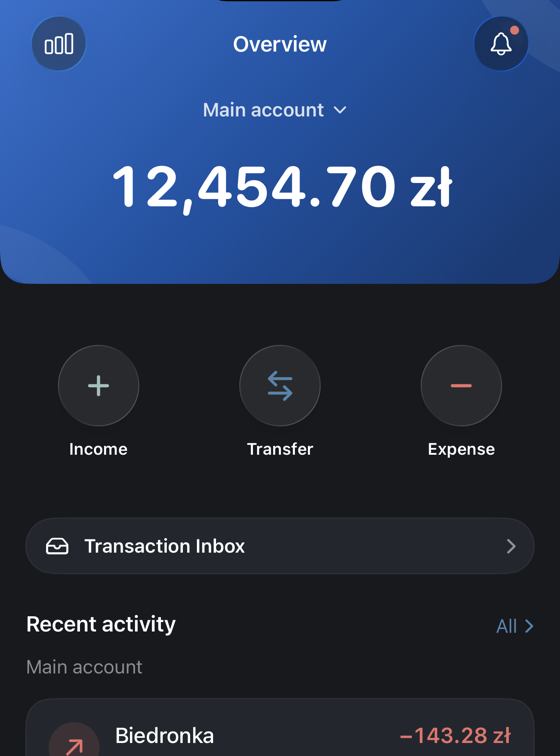
Atria helps you stay on top of your money without the usual mess: expenses, recurring payments, budgets, debts, goals and reports — and you can see what will be left by the end of the month.

The Atria Overview screen on iPhone, showing a 12,454.70 zł balance above a list of recent transactions

Use Atria in the browser, or get it from the App Store. Same account, same data.

Three screens, and what each one is for.

Screenshots of the current iPhone release. Planning and budgets are part of Pro.

Plan

See how the month ends before it ends.

Atria adds up what is still coming in and what is still due, so on day 24 of 30 you already know what will be left instead of guessing.

  • Income and expenses measured against the plan, not only against each other
  • How far off plan you are, and how much budget headroom is left
  • The next planned payments, each with its date and account
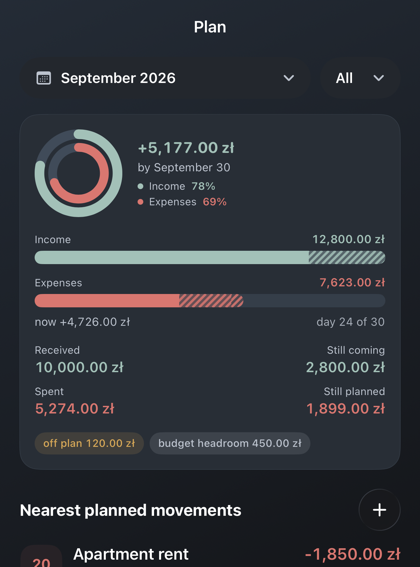
The Atria Plan screen for September 2026, forecasting +5,177.00 zł by the end of the month, with the next planned payments below

Budgets

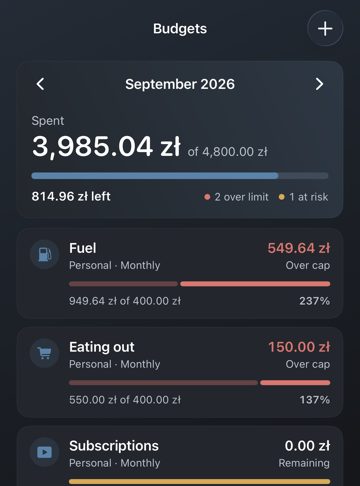
Budgets that tell you which one you broke.

Every category carries its own limit and its own period, and the ones over the cap are marked before you have to add anything up.

  • A monthly total, and what is still left of it
  • Progress per category, with over-limit and at-risk marked
  • Personal and family budgets in the same list
The Atria Budgets screen, showing 3,985.04 zł spent of 4,800.00 zł, with Fuel and Eating out over their limits

Accounts

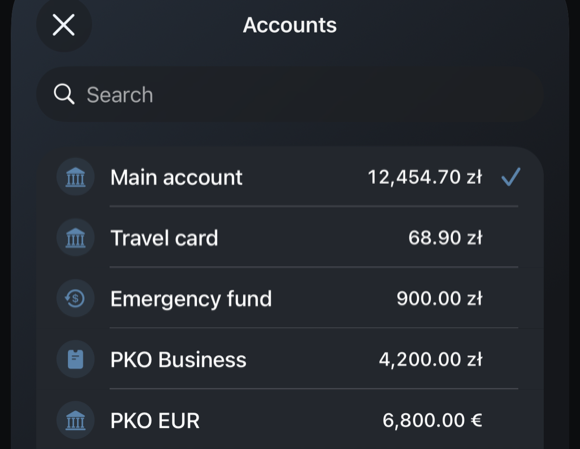
Every account in one list, in the currency it is kept in.

Cash, cards, bank accounts and savings sit together, each in its own currency. Switch the whole app to one of them, or look at all of them at once.

  • Accounts in different currencies side by side
  • Search, for when the list gets long
  • Archive an account without losing its history
The Atria account switcher, listing everyday, savings and business accounts in złoty and euro

And four things a screenshot does not show.

The parts of Atria that are worth knowing about before you install it.

  • Say it instead of typing it

    Hold the microphone, say what you spent, and check the account and category Atria picked before it saves.

  • Receipts read themselves

    Photograph a receipt and Atria fills the fields from it, so you are checking a transaction rather than entering one.

  • Both directions of a debt

    What you owe and what is owed to you, each with its next payment date, its currency and how much of it is left.

  • Investments in your own currency

    Portfolios and positions are converted into the currency you think in, so they count towards the same total as everything else.

Where Atria runs

Two of these you can use in the next minute. The third is honest about itself.

  • iPhone

    iOS 17 or later. Free to download.

    On the App Store
  • Browser

    The same account and the same data, on a bigger screen.

    No install
  • Android

    Being tested with a small group. There is no public Google Play listing yet, so there is nothing here to link to — when there is, this button becomes one.

    Closed testing
    Not on Google Play yet

Before you install it

The four things worth knowing, answered on the page rather than three clicks away.

Is Atria free?

Tracking is. Atria Lite keeps your accounts, transactions and activity at no cost, for as long as you want. The planning, budgets, debts and investments on this page are Pro, sold as a subscription or as a one-time purchase inside the app. You do not need a card to start.

Do I have to connect a bank account?

No. Atria works from records you add yourself, import, or confirm from a receipt. Nothing has to be connected for the app to be useful.

What happens to my financial data?

It is stored to run the features you use and to sync them between your devices. Atria is not a bank and does not act as one. The privacy policy names what is kept and for how long.

Read the privacy policy

Can I delete my account and everything in it?

Yes, from inside the app, and the page below explains exactly what is removed and what a deletion cannot undo.

How account deletion works

Start tracking your budget today.

Open Atria in your browser, or get it from the App Store. Support, terms, and privacy details are here too when you need them.